


MTA TrainTime
4.62.38K Reviews
App Specs
- Version
- 10.13.0
- Updated On
- License
- Free
- Downloads
- 1,000,000+
- Developer
- MTA (Metropolitan Transportation Authority)
- Categories
- Maps & Navigation
- Platform
- Android, iOS
Screenshots
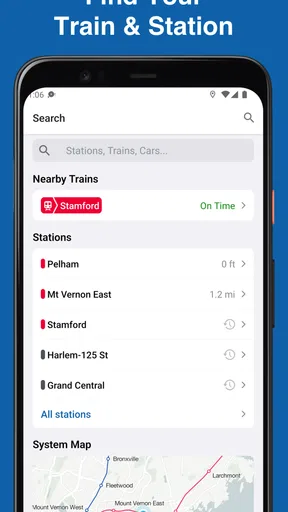
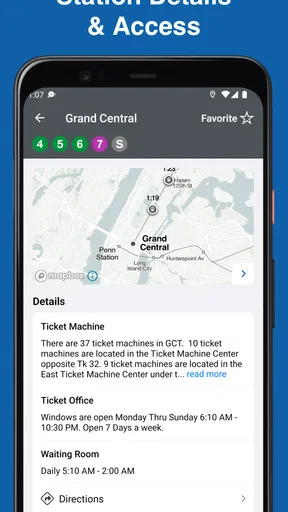
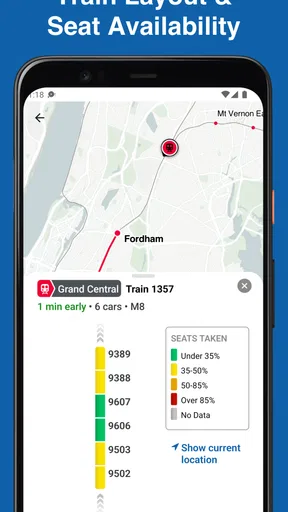
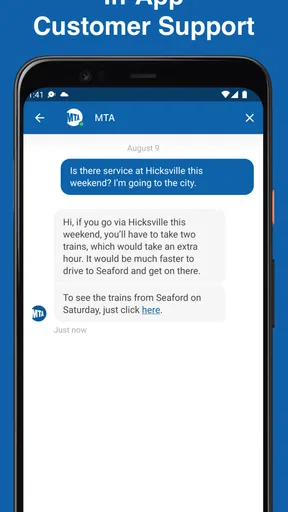
 Analysis by AppCompare
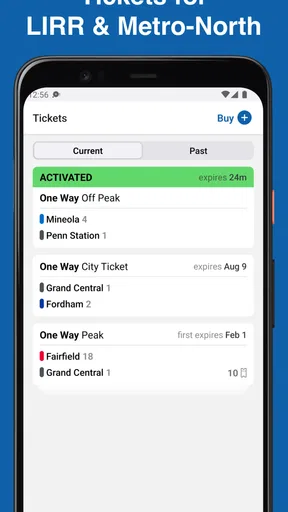
If you're a regular commuter in the NYC area, then you know the madness of catching the right train at the right time. Enter MTA TrainTime, an app from the Metropolitan Transportation Authority for planning trips and handling LIRR and Metro-North tickets. I’ve been using it for a while, and let me spill the tea on why focusing on your train journey in one place can make a busy travel day easier.
The useful idea behind keeping a trip together
The most practical way to think about TrainTime is as a rail-specific companion rather than a general map of the city. Its focus is LIRR and Metro-North travel, so it makes most sense when your journey depends on one of those services. Instead of beginning with a broad search across every possible mode, I can concentrate on the rail trip I need to make and use the app for the planning and ticket side of that journey.
That focus is helpful when I already know which railroad I’m taking, but it also sets a boundary. If I need to compare a train with a bus, subway, walking route, or a mix of several operators, a citywide navigation app may be a better starting point. I would use TrainTime for the train portion and a broader map for the parts beyond it, rather than expecting one tool to answer every transportation question.
Getting Started with MTA TrainTime
First things first, downloading MTA TrainTime is a piece of cake. Whether you're an Android or iOS user, just hit up the Google Play Store or Apple App Store, and you're good to go. The app is free, which is always a bonus, and it installs in a jiffy. Once you open it, you're greeted with a clean and straightforward interface. No fuss, just straight-up functionality.
For Android users, the current version is 10.5.0 and the minimum operating system requirement is Android 7.0. That makes the platform requirements worth checking before relying on the app for a trip. It is rated for Everyone, so its audience is not limited to commuters with a particular kind of travel experience. Its 4.6 average from around 28,000 ratings, alongside more than 1 million installs, suggests that many people have made it part of their rail routine, though I’d still judge it by whether it fits my own route.
Features to Love
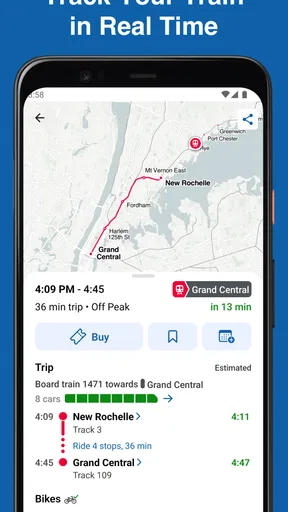
Now, let’s dive into what makes this app tick. The real-time train tracking is hands down one of the top features. You can see exactly where your train is on the line, which is super handy when you're juggling a tight schedule. No more guessing if you're going to make it or not.
In practice, I find it most useful to check tracking as a decision aid, not as a promise that every minute of a trip will go exactly to plan. If I’m still at home, a train’s position can help me decide whether to leave now or take a breath and prepare for a later departure. If I’m already on my way to the station, I can check again before committing to a sprint. The useful habit is to look at the train’s movement alongside the trip I intend to take, rather than treating a map marker as a substitute for paying attention to station announcements or the situation around me.
Worth Reading Before You Choose

EA SPORTS FC Mobile 26 Is a Bigger Football Game, but It Takes Time

Flipboard Shows What News Apps Must Do Beyond the Feed

Switching to Android Auto Means Rethinking Your Driving Routine

Google Calendar Makes a Crowded Week Easier to Manage

Ludo King Makes the Most of the Minutes Between Plans

Baby Panda World Brings Quick Play to Modern Phones, but Its Game Library Feels Busy
That distinction matters most when a connection is tight. A location update can help me understand whether the train is approaching, but it cannot make a short transfer comfortable or remove the uncertainty of moving through a busy station. When the connection is important, I’d plan with enough breathing room to handle ordinary delays. Tracking is best at reducing avoidable guesswork, not at making a risky connection risk-free.
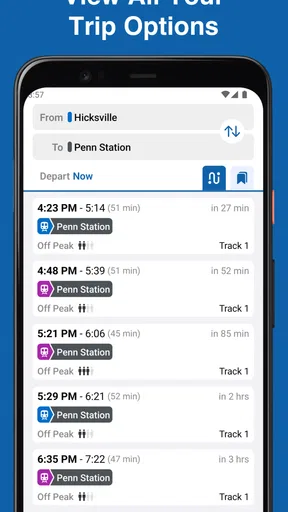
Another standout feature is the trip planner. You pop in your start and end stations, and it lays out your entire journey, complete with transfer options if needed. It even gives you an estimate of how long it’ll take, which is perfect when you’re planning your day. It’s like having a personal travel assistant right in your pocket.
A small but useful workflow is to check the plan before leaving, then revisit it when your day changes. For instance, if I’m finishing an appointment later than expected, I can rethink the rail leg instead of relying on the schedule I glanced at hours ago. I would also double-check that I selected the correct stations, especially when a place name or destination has more than one plausible stop. A journey plan is only helpful if its starting point and endpoint match where I’m actually going.
And let's not forget about the push notifications. The app sends alerts about delays, schedule changes, or any unexpected hiccups along your route. Trust me, those heads-up notifications can save you from a lot of commuter headaches.
Notifications are most valuable when I have a specific journey in mind and can act on an alert. I’d treat them as a nudge to check the trip again, rather than assuming an alert covers every change that could affect the whole day. If I’m making a longer plan or the timing is important, checking the route directly before setting out gives me a chance to respond in context. This is also a good reason to keep the journey details clear: a useful warning is only useful if it relates to the trip I care about.
User Experience
Navigating the app is as smooth as a fresh jar of Skippy. The layout is intuitive, with everything you need just a tap away. I love how you can easily switch between different train lines and check out the schedules. It’s all about efficiency here, folks.
The app’s railroad focus can save time for riders who already know their usual station pair. I don’t have to begin by sorting through unrelated transport modes just to get to the train information I need. On the other hand, someone new to the region may need help identifying which service and station suit a destination before the app becomes straightforward. In that situation, I’d first use a map or other local guidance to establish the rail route, then use TrainTime to handle the LIRR or Metro-North portion.
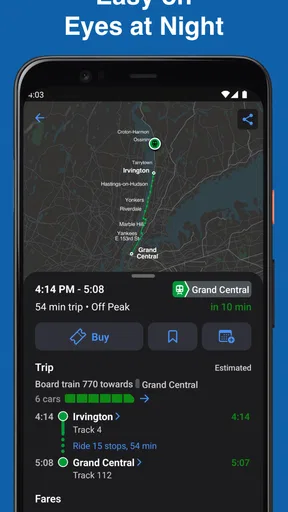
The design is sleek and modern, without any unnecessary clutter. The color scheme is easy on the eyes, which is essential when you’re half-awake during those early morning commutes. The app loads quickly, too, so you’re not stuck waiting around for ages.
For an everyday routine, I’d avoid trying to solve the entire commute while walking through a crowded station. It’s easier to check the trip before leaving, keep the station names in mind, and use a quick look later only when a change in timing makes it necessary. That approach makes a planning app more useful without turning every platform wait into repeated screen-checking.
Why It Stands Out
What really sets MTA TrainTime apart is its reliability. In the world of commuting, where things can go off the rails (pun intended) at any moment, having a trustworthy app makes all the difference. The real-time updates are accurate, and the app rarely crashes, which is a huge plus in my book.
Compared with a general navigation app, TrainTime’s advantage is its specific attention to LIRR and Metro-North trips and tickets. A broad map is often better for comparing rail with other modes, understanding a destination’s wider surroundings, or planning a journey that involves services outside those railroads. TrainTime is the more natural choice when the question is, “How do I handle this LIRR or Metro-North trip?” I see the two kinds of app as complements, not replacements: one helps with the wider journey, while the other stays focused on the rail trip.
Additionally, the app is constantly updated with new features and improvements. The developers seem committed to enhancing user experience, which is always a good sign. They even have a feedback section if you want to suggest features or report issues.
TrainTime is not the right fit for every traveler. If I were planning a trip that depends mainly on subway or bus connections, or if I needed a single view of several transport providers, I’d begin with a broader navigation option. And if I rarely take the LIRR or Metro-North, installing a rail-focused app may add little to my routine. The strongest reason to keep it is a recurring or upcoming trip on one of those services, especially when having the ticket and trip planning close at hand is convenient.
Putting it to work on a normal travel day
Imagine I have an appointment in the city and need to take an LIRR train from a station I use regularly. Before I leave, I enter my destination in the trip planner and check the proposed rail journey. If my timing changes while I’m getting ready, I can look again rather than assuming my first plan still works. On the way to the station, train tracking gives me another point of reference; if an alert arrives, I can revisit the route and decide whether I need to adjust. That is a realistic, useful role for the app: it keeps the rail decision in view without pretending to control the trip.
For a first-time visitor, I’d use a slightly different sequence. I’d establish how to reach the right railroad station and how to continue from the arrival station with a general map or local information, then use TrainTime for the LIRR or Metro-North leg. That division of work avoids the common mistake of treating a rail itinerary as if it automatically solves the walk, subway, or other transport at either end.
Who gets the most from it
I’d recommend TrainTime most readily to people who regularly ride the LIRR or Metro-North, occasional passengers who want to plan one of those trips, and anyone who values keeping rail planning and ticket-related tasks within a railroad-focused app. Its free price removes a cost barrier, and the wide adoption reflected in its rating and install figures makes it an established option for this specific kind of travel. Still, popularity does not make it a universal route planner: the deciding question is whether these rail services are actually part of your journey.
For someone who commutes frequently, the practical benefit is not just seeing a schedule once. It is being able to check the plan again when a meeting runs late, an alert changes the situation, or a normal routine becomes less predictable. For a traveler who takes the train only occasionally, it can still be useful as a focused planning tool, but I’d recommend learning the station and onward-transport details separately rather than expecting the app to cover every local step.
Final Thoughts
All in all, MTA TrainTime is a must-have app for anyone navigating the NYC train lines. It’s like the Swiss Army knife of commuting apps, packing in all the essentials you need to make your journey as smooth as possible. Whether you’re a daily rider or an occasional traveler, this app has got your back.
So, if you haven’t already, give it a whirl. It’s free, it’s functional, and it might just become your new commuting best friend. Happy travels!
My honest recommendation is a little more specific: I’d keep it close if I ride the LIRR or Metro-North and want a focused way to plan that rail journey, check train movement, and stay attentive to travel changes. I wouldn’t rely on it as my only tool for a multi-mode trip or as a substitute for checking the full route at the points where a connection matters. Used for what it is best at, it can make the train part of an ordinary travel day feel less like guesswork.
Pros
- Real-time train updates enhance planning.
- User-friendly interface for easy navigation.
- Customizable notifications for schedule changes.
- Detailed station information available.
- Supports multiple languages for global users.
Cons
- Occasional delays in data updates.
- Limited offline functionality.
- Ads can be intrusive at times.
- Requires constant internet connection.
- Battery consumption is relatively high.
FAQs for MTA TrainTime
What features does MTA TrainTime offer to enhance my commuting experience?
MTA TrainTime provides real-time train tracking, schedule information, and platform details to improve your commuting experience. With features like push notifications for service alerts and the ability to view train capacity, you can plan your trips more efficiently and avoid crowded trains, making your daily travels smoother and more predictable.
Is MTA TrainTime available on both Android and iOS platforms?
Yes, MTA TrainTime is available for download on both Android and iOS devices. You can find it on the Google Play Store for Android users and the Apple App Store for iOS users, ensuring broad accessibility for all commuters who rely on MTA services for their daily transportation needs.
How accurate is the real-time tracking on MTA TrainTime?
The real-time tracking on MTA TrainTime is generally very accurate, as it pulls data directly from the MTA's systems. While occasional discrepancies can occur due to technical issues or unforeseen circumstances, the app is designed to provide the most up-to-date information to help you plan your journey effectively.
Can I purchase tickets through the MTA TrainTime app?
Currently, MTA TrainTime focuses on providing scheduling and real-time tracking information. For purchasing tickets, you may need to use the MTA eTix app, which is designed specifically for ticket transactions. However, MTA TrainTime does offer links and guidance to facilitate easy ticket purchasing.
Does MTA TrainTime offer customer support in case of issues?
Yes, MTA TrainTime provides customer support through various channels. Users can access support via the app’s help section, which includes FAQs and contact options for customer service. This support ensures that any issues or questions you encounter while using the app can be promptly addressed.


